# Solution Overview

Overview of Appsurify TestBrain Solution: AI-Powered Risk Based Testing, Flaky Test Management, Your Model Insights & Performance, and Test Run Analytics.&#x20;

[Appsurify ](https://appsurify.com/)is a **QA Intelligence Platform** focused on optimizing CI pipelines and Automated Test Runs through its **patented** Risk-Based Testing Technology for Faster Test Feedback and Streamlined Workflows.&#x20;

## Patented Risk-based Testing Technology&#x20;

Appsurify's patented proprietary Risk-based testing technology leverages AI/ML to auto select and execute **only the tests relevant** to recent Developer changes on a per Commit basis.&#x20;

By only running a **Smart Subset** of tests, teams **optimize** their CI pipeline and get Test Feedback to QA & Developer **10x faster** - freeing up infrastructure resources and increasing team output.&#x20;

Appsurify is **code-language agnostic** and supports **all test types**, such as UI, E2E, API, Integration, Unit, etc.&#x20;

Best practice has Teams running dynamic smart subsets throughout the day with a schedule Full Run periodically to catch anything that may have been missed in the Smart Test Selection.&#x20;

This Best Practice is adopted by tech giants, Facebook and Google. Link [here](https://engineering.fb.com/2018/11/21/developer-tools/predictive-test-selection/). &#x20;

## Flaky Test Management

Appsurify has **two** underlying AI-Models, one for Risk Based Test Selection and another for **Flaky Test Management.**&#x20;

Appsurify's Flaky AI-Model can distinguish tests that have failed due to real defects versus tests that have failed due to Flakiness, i.e., no underlying change to the codebase.&#x20;

<figure><img src="https://209747829-files.gitbook.io/~/files/v0/b/gitbook-x-prod.appspot.com/o/spaces%2F4T7DHW2jpYykW9Zaqh7V%2Fuploads%2FE1Ngl105q7gq474ENwgn%2Fimage.png?alt=media&#x26;token=6452c178-d9ab-4ca6-8bac-4d1ca0b6af60" alt="Stop Flaky Tests" width="469"><figcaption><p>Give Developers and QA Clean Signals throughout the Day! </p></figcaption></figure>
Flaky Tests or False Flags **distract** Developers and **QA** teams from the real-defects.&#x20;

By leveraging Appsurify's Flaky AI-Model, teams can optionally configure their Builds and Test Runs to fail only on **Real-Defects** even when there is a high percentage of Flakiness in their test runs to keep their Builds and Test Executions running optimally.&#x20;

Because giving **clean signals** back to Developers and QA **saves precious time** during the workday.&#x20;

## Your Model Insights & Performance

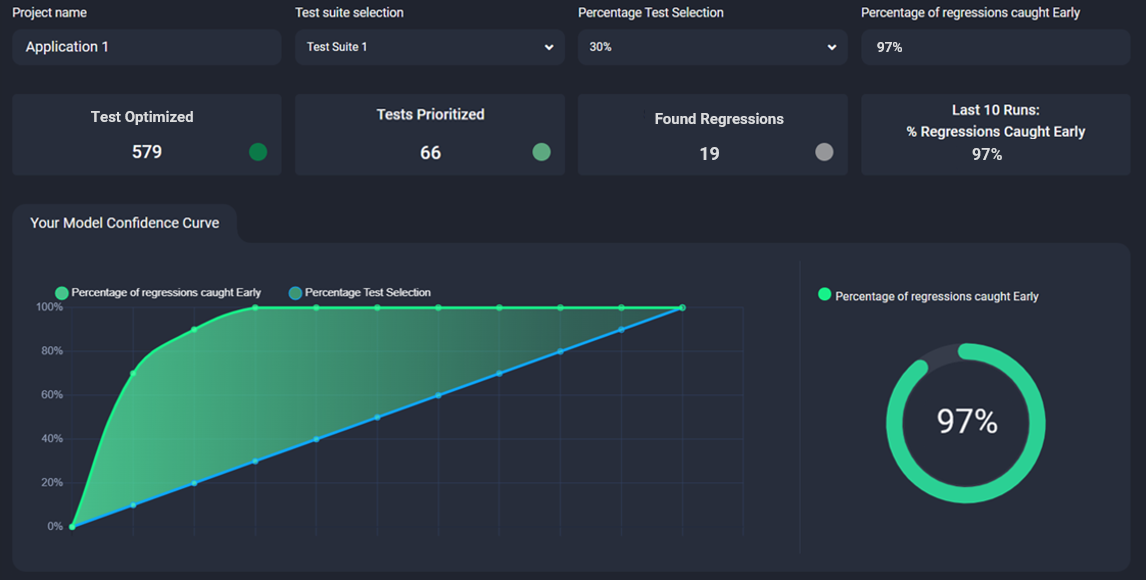
One of the latest features and value additions to the Appsurify **QA Intelligence Platform** has been the introduction of **Your Model Insights Page** in the UI.&#x20;

**Trust** is the cornerstone of AI/ML, and Your Model Page gives **full transparency** into your Model's Performance on a Per Run basis.&#x20;

<figure><img src="https://209747829-files.gitbook.io/~/files/v0/b/gitbook-x-prod.appspot.com/o/spaces%2F4T7DHW2jpYykW9Zaqh7V%2Fuploads%2FsK3Y213ghkWlMvdL33Ou%2Fimage.png?alt=media&#x26;token=9be3e184-8033-4422-86c3-290282ca7ff4" alt="AI Model Performance" width="563"><figcaption><p>Test it! <strong>Select</strong> a Percentage of Tests to Run to See how Your Model Performs at the most Granular Level!</p></figcaption></figure>

**Simulate** how your Model will perform on a per Run Basis by selecting a Percentage of Tests to Run to see which tests are Optimized (not run), Prioritized (run), Regressions Found Early (defects caught in smart subset), and anything the AI-Model may have missed in Deferred Regressions (Defects that will be picked up at the next Full Run).&#x20;

Once Appsurify is engaged and actively Prioritizing your Tests, Your Model Insights page will **always be available for reference** to ensure you always have **visibility and trust** in an easy to understand Dashboard on how your Model is performing in Real-Time.&#x20;

More information on [Your Model Insights & Performance](https://docs.appsurify.com/ui-and-value-features/your-model-insights).&#x20;

## Test Run Analytics

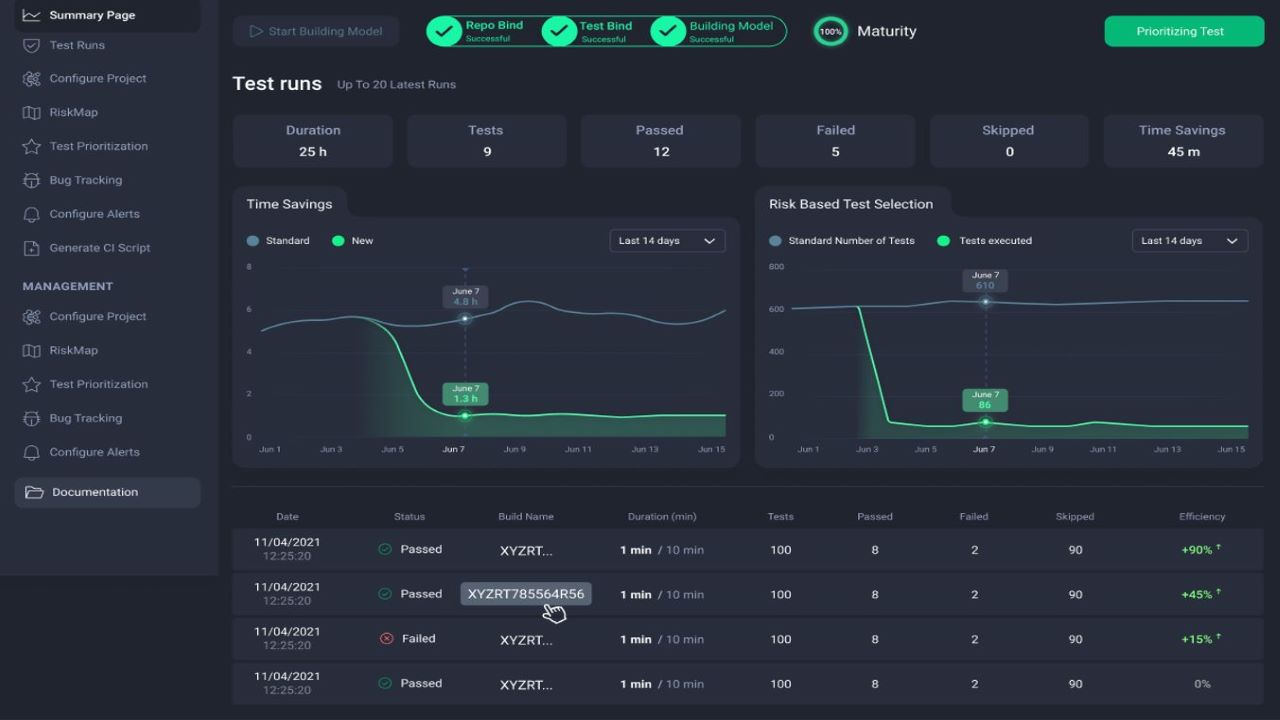
In your Summary Page, have a complete view to the value your Risk Based Test Selection is having on your team's newly optimized workflows and Test Run Analytics

<figure><img src="https://209747829-files.gitbook.io/~/files/v0/b/gitbook-x-prod.appspot.com/o/spaces%2F4T7DHW2jpYykW9Zaqh7V%2Fuploads%2Fg2EOnEDHTHfbMjrW9bnI%2FAppsurify_Dashboard.JPG?alt=media&#x26;token=8ba61092-fbdf-4b58-ba4e-9d77b01e84cd" alt="CI Optimization Analytics" width="563"><figcaption><p>Dashboard into Real-Time Analytics</p></figcaption></figure>

Dynamically see how each test run is performing and bringing faster value to your organization.

* Follow the Health and Integration for the Project to Optimize.
* Gain insight into the Maturity of their Model for the active Project via the "Maturity Wheel"
* Visibility into the Value Appsurify brings through the "Time Savings" and "Risk Based Test Selection" Graphs.
* More information on the [Dashboard here](https://docs.appsurify.com/ui-and-value-features/dashboard). <br>

## Next: [Getting Started! ](https://docs.appsurify.com/getting-started/getting-started)


---

# Agent Instructions: Querying This Documentation

If you need additional information that is not directly available in this page, you can query the documentation dynamically by asking a question.

Perform an HTTP GET request on the current page URL with the `ask` query parameter:

```
GET https://docs.appsurify.com/getting-started/solution-overview.md?ask=<question>
```

The question should be specific, self-contained, and written in natural language.
The response will contain a direct answer to the question and relevant excerpts and sources from the documentation.

Use this mechanism when the answer is not explicitly present in the current page, you need clarification or additional context, or you want to retrieve related documentation sections.